I ran my job search like a GTM engineer
A Clay workflow that enriches 50 target companies, reads every careers page with an AI research agent, and filters to the small companies with a live role worth a direct note. Built in an afternoon for about 150 credits. Replaced roughly ten manual careers-page checks a day.
Tool
Clay
Scale
50 companies
Cost
~150 credits
Time
One afternoon
I was checking ten careers pages a day by hand.
Fifty target companies, a handful of role titles I actually qualify for, and no way to know which of them had posted something in the last two weeks without opening every board myself. It is the kind of repetitive, high-volume, low-judgment work that is worth automating exactly once.
So I built the sourcing engine in Clay.
01
What it does
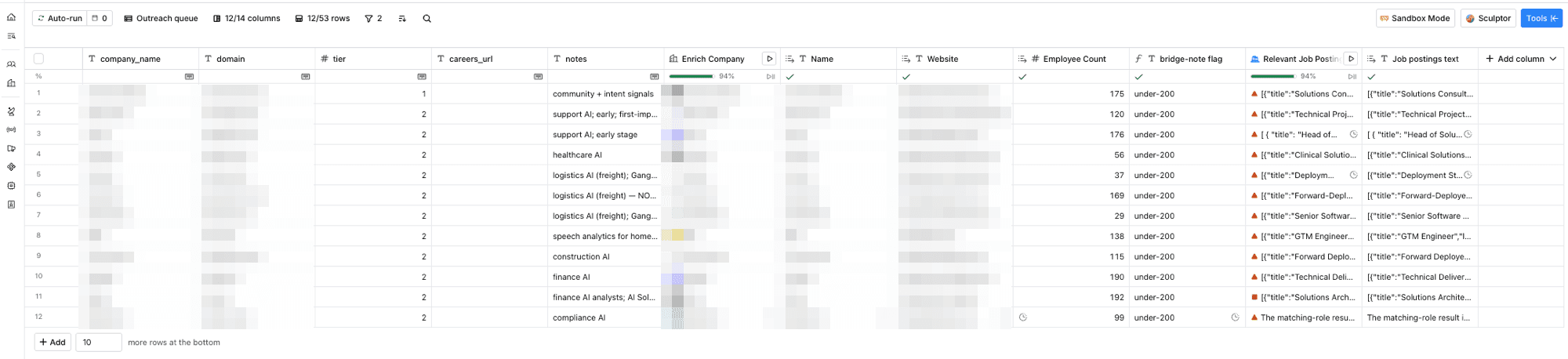
One table, fifty companies, four columns doing the work:
Enrichment. Company name and domain in, employee count and firmographics out. About a dozen of my companies had ambiguous names where a guessed domain would point at the wrong business entirely (the freight AI company Augment is not the coding tool Augment), so those rows went in blank on purpose and got resolved with a domain waterfall rather than a guess.
An AI research agent per company. For each domain, find the careers page and any linked job board, enumerate every open role across all departments and locations, then keep only the ones matching my lanes: GTM Engineer, Revenue Operations, Implementation, Solutions, Deployment, Onboarding, Enablement, Product Operations. Return structured JSON with title, location, minimum years, and a direct URL.
A flag column. Under 200 employees means the company is small enough that a direct note to a founder or hiring lead is the right move rather than an application into an ATS. Over 200 means apply normally. One formula, no credits, encodes a rule I was previously applying from memory.
A filtered view. Under-200 AND has a live matching role. That view is the outreach queue.
02
What came out
Twelve companies surfaced with live roles in my lanes and small enough teams to reach directly: Solutions Consultant, Head of Solutions, Deployment Strategist, Forward-Deployed roles, GTM Engineer, Technical Delivery, Solutions Architect. Across the full fifty, the agent also confirmed honest “none” results at companies with nothing open, which is worth as much as the hits. It means I can stop checking those this week.
Total cost: about 150 credits and one afternoon.
03
What broke, and what fixing it taught me
The enrichment ran on all fifty rows when I had selected ten. I had turned auto-run off but ran the column without restricting it to my selection, so forty companies that already had good domains got re-resolved against name-only matching. That produced collisions: Unify resolved to a telecom vendor, Palantir to an unrelated software company. No damage to the underlying data, because the downstream enrichment keyed off my original column, but it burned credits on noise. The habit that comes out of this: test on five rows, then run on a defined selection, and never trust that a column will only touch what you think it will.
The first agent prompt skimmed. It read careers pages and returned plausible-looking results, but on a company where I already knew a specific role was posted, that role was missing. The reasoning trace made the diagnosis possible: the agent had found four roles and matched all four correctly. This was a retrieval gap, not a matching gap. It had not enumerated the full board before filtering.
The fix made things worse before it made them better. I rewrote the prompt to demand exhaustive enumeration first, and the agent went from a shallow pass to reporting 118 open positions across every department and location. But the same rewrite tightened matching so hard that it dropped a role titled “Senior Product Operations Manager,” which contains one of my keywords literally. A prompt that can lose an exact keyword match is not stable enough to run across fifty companies.
Version three separated the steps. Enumerate everything. Then match, with an explicit rule that seniority words like Senior, Lead, and Manager never disqualify a title, and that borderline cases should be included and flagged rather than dropped. Then dedupe, combining the same role listed across multiple regional pages into one entry. That version held: full recall, clean output, correct experience flags.
I verified against an answer key. Before running the full table, I tested on companies where I already knew what was posted. Two matched exactly. The third did not, and rather than assume a bug, I checked the company’s live board directly: the role had closed. My answer key was stale, not the agent. Knowing which one you are looking at is most of the work.
04
The thing I did not expect
Two things, actually.
The first is that the table caught a change I had missed. One of my target companies came back with a different name and a headcount I did not recognize. It had rebranded and raised a Series B months earlier. My list was stale and the enrichment was current. The system knew something about my own pipeline that I did not.
The second is how little of the difficulty lived in the tool. The UX is genuinely easy: columns, inputs, run. Every hard moment in this build was a specification problem. Knowing that “enumerate then filter” beats “find the matching ones.” Knowing that a stricter prompt can quietly cost you recall. Knowing to test against cases where you already know the answer. The tool executes; the judgment about what to ask it for is the actual job.
Which is a reasonable description of GTM engineering in general.
05
What is next
The same pattern extends: a roles table pulling fresh postings from job-change signals, a people table finding the right person at each company with a researched opening line, and a daily sync so the queue maintains itself.
The engine works. I am using it.